Table of contents
🤖
AI-generated summary
Hey everyone, friends of productivity and digital well-being! Today I wanted to talk about a super effective method for managing your time and staying hyper focused on your tasks: Pomodoro. For me, it’s become an essential tool for fighting procrastination and keeping my energy levels up throughout the day :-)
So how does this little gem work? It’s dead simple:
- I pick my target: a specific task to accomplish.
- I set my timer: 25 minutes, not a second more! That’s the famous “pomodoro.”
- I dive in: I work at full speed, no distractions, until the timer goes off.
- I breathe: a short 5-minute break. Time to decompress a bit :-)
- I recharge: after four pomodoros, I give myself a longer break — between 15 and 30 minutes — to fully recharge.
This technique is great because it really helps me stay focused and avoid mental fatigue. I feel much more efficient and less stressed!
Now, if you’re like me and you love simplicity, you know there are a ton of apps out there to manage your pomodoros. But if you have a Mac or an iOS device, I have an even simpler and free trick for you! Imagine being able to start a pomodoro with a single gesture on your iPhone using the Action button, or from Spotlight on your Mac. Pretty sweet, right? :-)
Let me quickly explain how I set this up using the Shortcuts app. The idea is to create a shortcut that not only starts your 25-minute timer, but also activates “Do Not Disturb” mode on your devices. No more notifications blowing your concentration! It’s really the key to being even more focused on what you’re doing.
Since a picture is worth a thousand words, and to help you visualize the setup in the Shortcuts app, here’s a preview of what you’ll need to recreate:
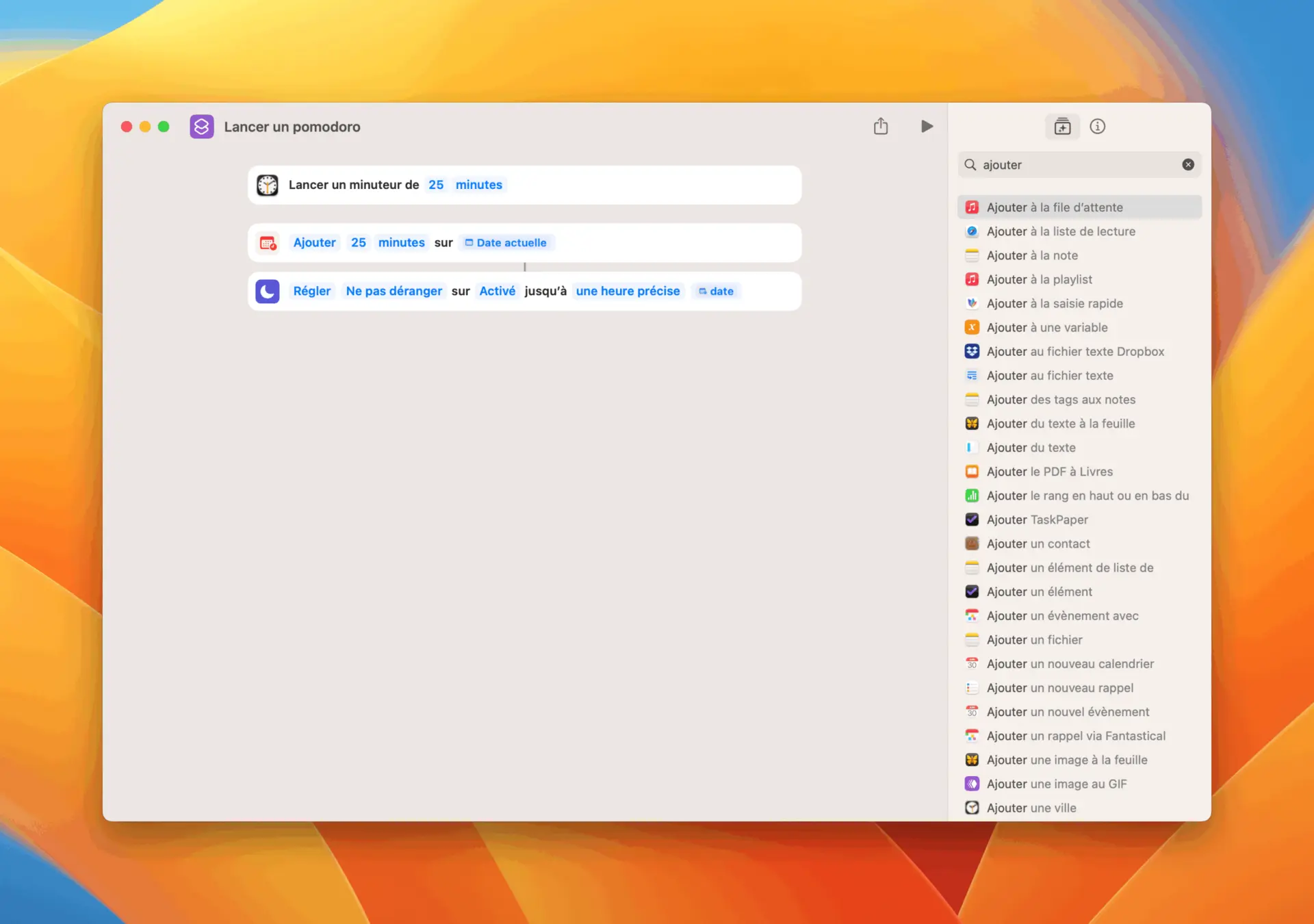
So, as I was saying, you can configure your iPhone’s Action button to trigger it, and on Mac, just hit Spotlight, type the name of the shortcut you gave it, and boom — your Pomodoro is running!

Now you really have no more excuses to procrastinate. Here’s to maximum productivity and full, satisfying days! :-)
So as I was saying before, you can configure your Action button on the iPhone to trigger it, and then on Mac you can simply use Spotlight, type the name of the shortcut you gave it, and it will launch the Pomodoro. Now you have no more excuses to procrastinate.